How to transfer a control panel account to another user
How to change the owner of your personal account
An account can be transferred in two ways:
- by contacting support;
- by updating account details manually.
Method 1. Via Support
Submit a request:
- through the Support section in the control panel
- or by email:
client@rx-name.ua
client@server.ua
Provide the new owner’s details:
- Full name
- Email
- Phone number
- Residential address
After verification, support will update the account ownership.
Method 2. Manual ownership change
Ownership details can be updated in profile settings.
Steps:
1. Log in to the control panel
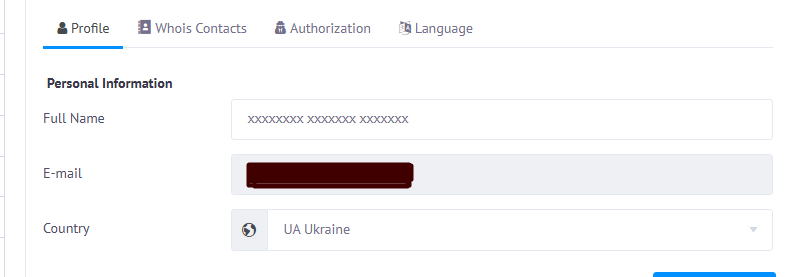
2. Go to Settings → Profile

3. Enter the new owner’s details:
- full name / company name
- region
- phone number
4. Click Show more and fill in:
- city
- address
- ZIP / postal code
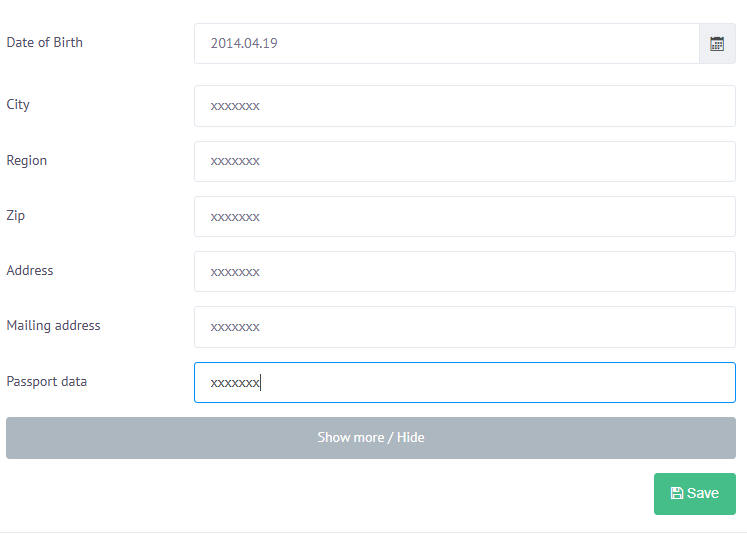
5. Save changes
After saving, the account will be registered to the new user.