How to Verify a Domain via DNS Record (CNAME / TXT) to Obtain an SSL Certificate
Domain validation for SSL via DNS
Verifying domain ownership is a mandatory procedure when connecting third-party services such as mail platforms, SSL certificates, web analytics, or CDNs. The most popular and reliable verification methods are adding a special TXT or CNAME record to your domain’s DNS zone. In this guide, we will look in detail at where to get the data for the record, how to correctly enter it into the control panel, and how to verify successful DNS updates.
Step 1. Obtaining Verification Data (CNAME or TXT)
When applying for an SSL certificate in your account, the system will generate unique values:
Example CNAME Record:
- Name / Host:
_a1b2c3d4e5f67890123456789abcdef0.yourdomain.com - Value / Target:
_f9e8d7c6b5a43210987654321fedcba0.comodoca.com
Example TXT Record:
- Name / Host:
@oryourdomain.com - Value / Text:
sectigo-domain-verification=3a2b1c4d5e6f7g8h9i0j
Step 2. Navigating to DNS Zone Management
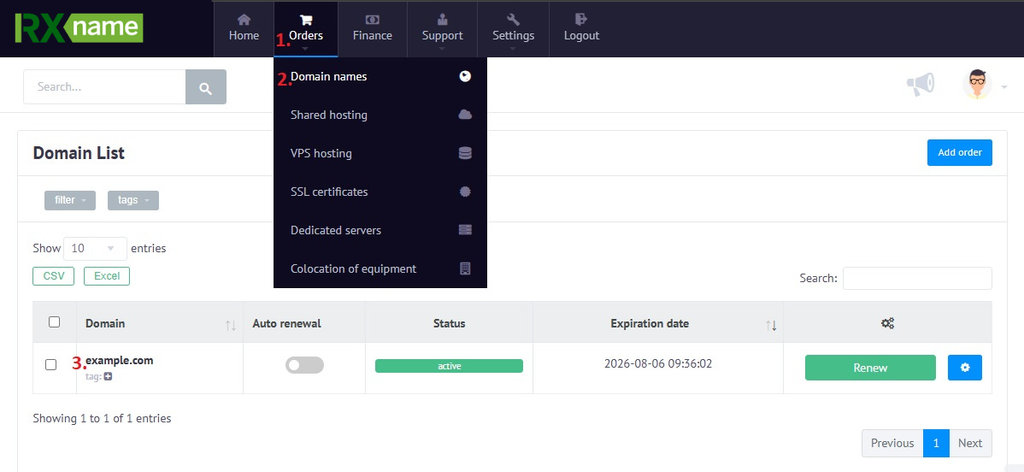
To make changes to the DNS zone, you need to log in to your hosting provider’s personal account.
- Log in to your personal account.
- Go to the “Orders” section.
- Go to the “Domain Names” section.
- Select your domain.
Step 3. Adding the CNAME or TXT Record
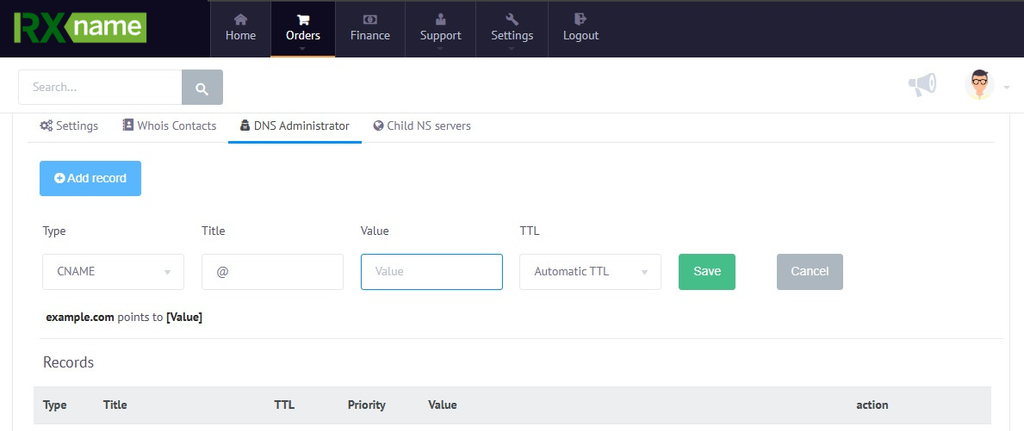
Once the DNS zone editor is open, click the “Add Record” button and fill in the fields:
- Type: Select
TXTorCNAMEfrom the list depending on the service requirements. - Name / Host: Enter the obtained record name or the
@symbol if the record is being created for the root domain. - Value / Target: Paste the copied value or address from Step 1.
- TTL: You can leave it as default (for example,
3600seconds or Auto).
Save the changes by clicking “Save”.
Step 4. Verifying DNS Updates and Completing Verification
After adding the record to the DNS zone, global DNS server cache updates can take anywhere from a few minutes to 24 hours.
To check if the new record has appeared on the network, you can use specialized online services (for example, nslookup.io or Google Admin Toolbox Dig):
- Enter your domain name in the search field.
- Select the record type TXT or CNAME.
- Verify that the value you entered is displayed.