How to Install Docker and Docker Compose on a VPS Using Pre-installed Programs
Deploying Docker and Docker Compose on a VPS
1. What is Docker
Docker is a platform for running applications in containers. It allows you to deploy services quickly without manually installing all required components.
Together with Docker, you can install Docker Compose, which is used to manage and run multiple containers using a single configuration file.
2. How to Install Docker
After creating your VPS:
1. Log in to your client area.
2. Open the Orders-VPS hosting section.
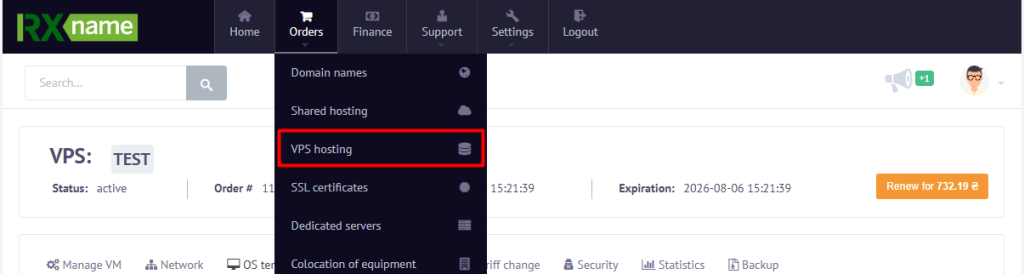
3. Select your VPS and click.
4. Open the OS Templates section.

5. Go to Pre-installed programs.
6. Select Docker + Compose install.
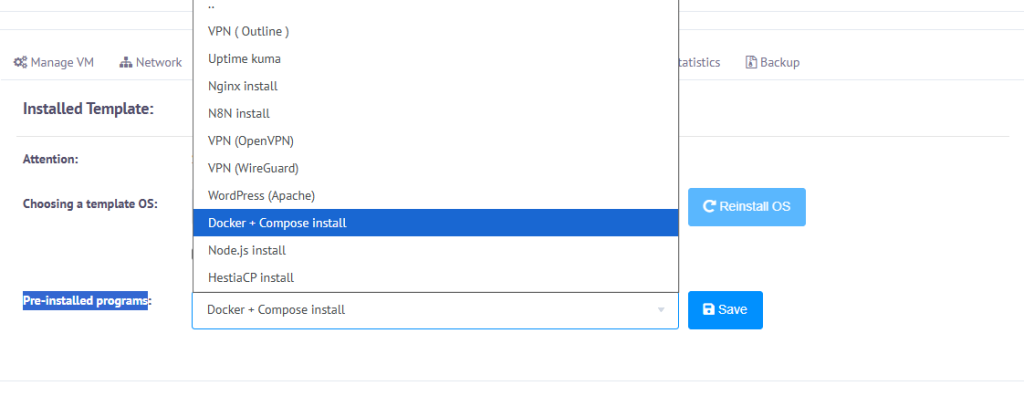
7. Start the installation.
Once the installation is complete, Docker and Docker Compose will be installed automatically on your server.
3. Verify the Installation
Connect to the server via SSH and run:
docker --version
To verify Docker Compose, run:
docker compose version
If the commands display version information, the installation has been completed successfully.
4. What You Can Use Docker For
After installation, you can quickly deploy various services, including:
- WordPress;
- Nginx;
- Uptime Kuma;
- n8n;
- databases;
- VPN servers;
- other Docker-based applications.
5. Common Issues
Docker was not installed
Make sure you selected Docker + Compose install in the Pre-installed programs section before starting the installation.
docker command not found
Wait until the installation has finished or restart the VPS and reconnect to the server.
6. Conclusion
The Docker + Compose install allows you to install Docker and Compose in just a few clicks without manual server configuration. Once the installation is complete, you can immediately start deploying containers and applications.